Page 13 of 92
Re: Google Chrome Extension
Posted: 10 July 2024, 10:34
by Tof63
Hello everyone!
I've just published a new version (as usual, you have to wait for it to be validated by Google)...
- Dark mode changes to manage recent changes to the site, especially on the home page. (I may have missed something, please let me know if you see something wrong).
- Better compatibility with "Kiwi Browser" on Android smartphones. If you want to have the dark mode on mobile, it's now possible

- Dark mode compatibility with a dozen more games.
--------------
Bonjour tout le monde !
Je viens de publier une nouvelle version (comme d'habitude il faut attendre que ce soit validé par Google)...
- Modifications du mode sombre pour gérer les modifications récentes du site, notamment sur la home page. (Il est possible que quelque chose m'ait échappé, dites moi si vous voyez quelque chose qui ne va pas).
- Meilleure compatibilité avec "Kiwi Browser" sur les smartphones Android. Si vous voulez avoir le mode sombre sur mobile, c'est maintenant possible
- Compatibilité du mode sombre avec une dizaine de jeux supplémentaires.
Re: Google Chrome Extension
Posted: 10 July 2024, 11:08
by buu441
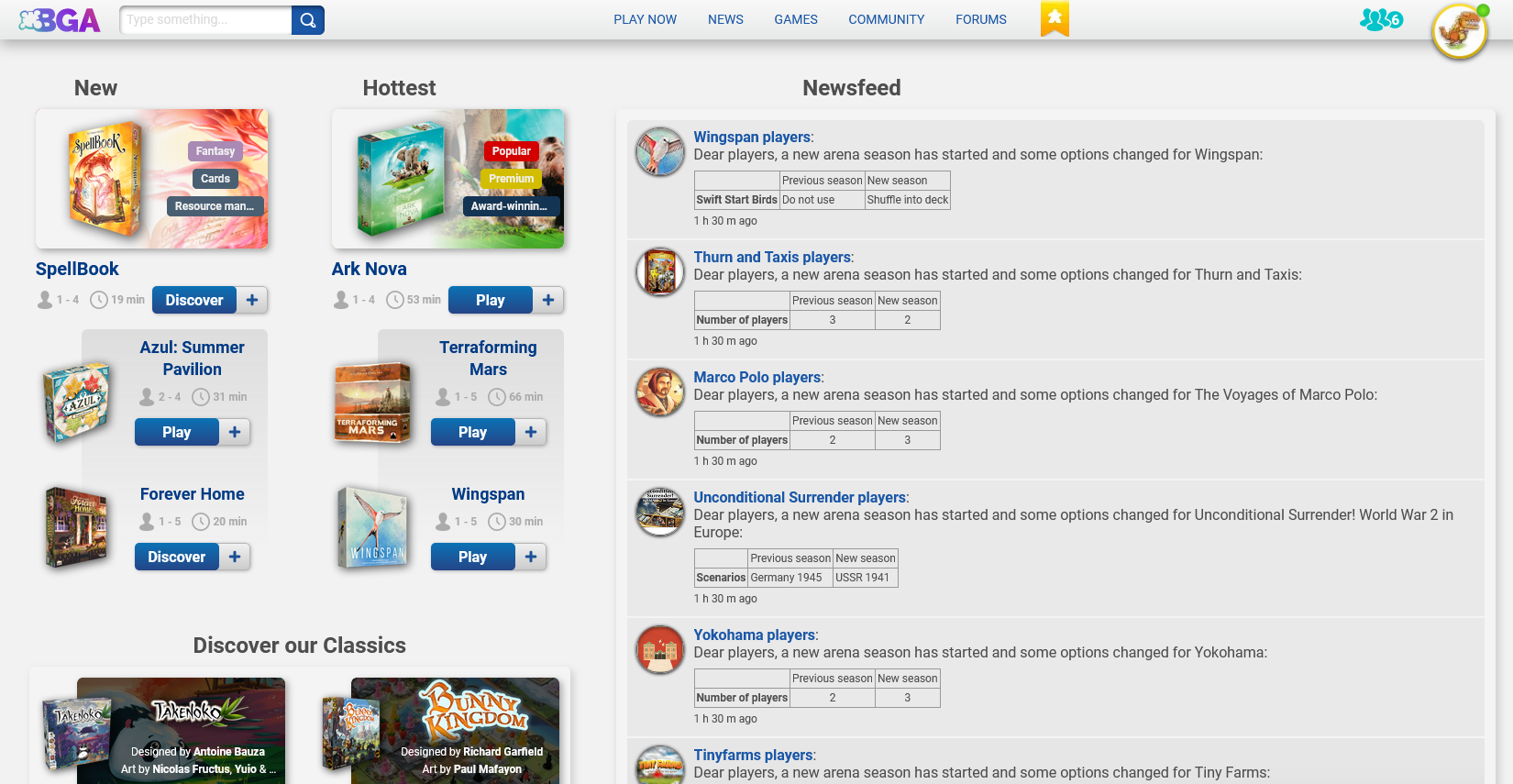
I know this is a very long shot, but can the extension by any chance do something about the atrocious new homepage? Not very hopeful, but doesn't hurt to try I guess xd
Re: Google Chrome Extension
Posted: 10 July 2024, 12:21
by Tof63
buu441 wrote: ↑10 July 2024, 11:08
I know this is a very long shot, but can the extension by any chance do something about the atrocious new homepage? Not very hopeful, but doesn't hurt to try I guess xd
It all depends on what you mean by "something"
Can you be a little more specific?
For the moment I've done the most obvious thing: fixing the style in dark mode, but if you have any ideas, let's talk about them!
Re: Google Chrome Extension
Posted: 10 July 2024, 13:00
by buu441
Well the most ideal thing would be to just revert it back to the way it was haha. Generally, I am looking for ways to hide all the bloat (so kind kill/hide elements on the page) on the homepage and just retain the boxes with newsfeed, tournaments and service status.
Re: Google Chrome Extension
Posted: 10 July 2024, 13:31
by Jellby
A start:
Code: Select all
.bga-homepage__games-section, .bga-homepage-header, .bga-latest-news__carousel, .bga-discover { display: none; }
Re: Google Chrome Extension
Posted: 10 July 2024, 15:19
by Tof63
Okay, I'll see what we can do! No promises
The new version is available! The style of the home page should now look nicer in dark ...
And, if any players are interested in testing, I'd love to hear your feedback on using the extension on mobile with Kiwi Browser!
Re: Google Chrome Extension
Posted: 10 July 2024, 15:30
by GTSchemer
buu441 wrote: ↑10 July 2024, 13:00
Well the most ideal thing would be to just revert it back to the way it was haha. Generally, I am looking for ways to hide all the bloat (so kind kill/hide elements on the page) on the homepage and just retain the boxes with newsfeed, tournaments and service status.
Jellby wrote: ↑10 July 2024, 13:31
A start:
Code: Select all
.bga-homepage__games-section, .bga-homepage-header, .bga-latest-news__carousel, .bga-discover { display: none; }
I was experimenting with something similar. A screenshot:
https://s20.directupload.net/images/240710/8mvhzp88.png
This was a quick attempt, so if anyone is interested in the CSS for personal / Chrome extension use, let me know and I can try to assemble it.
Re: Google Chrome Extension
Posted: 10 July 2024, 21:03
by Tof63
I've just published a new version.
I've added a few options in the "Settings" tab of the extension popup that I hope you'll like!
@GTSchemer : I took my inspiration from your screenshot

Re: Google Chrome Extension
Posted: 10 July 2024, 21:21
by GTSchemer
Tof63 wrote: ↑10 July 2024, 21:03
I've just published a new version.
I've added a few options in the "Settings" tab of the extension popup that I hope you'll like!
@GTSchemer : I took my inspiration from your screenshot
Do you have a screenshot? I can't see it without Chrome.
Also, for anyone playing with CSS, note that about 10 news items still exist -- BGA just hides most of them on most screen sizes for unknown reasons, even if you click the expand button.
Re: Google Chrome Extension
Posted: 10 July 2024, 21:34
by buu441
GTSchemer wrote: ↑10 July 2024, 15:30
buu441 wrote: ↑10 July 2024, 13:00
Well the most ideal thing would be to just revert it back to the way it was haha. Generally, I am looking for ways to hide all the bloat (so kind kill/hide elements on the page) on the homepage and just retain the boxes with newsfeed, tournaments and service status.
Jellby wrote: ↑10 July 2024, 13:31
A start:
Code: Select all
.bga-homepage__games-section, .bga-homepage-header, .bga-latest-news__carousel, .bga-discover { display: none; }
I was experimenting with something similar. A screenshot:
https://s20.directupload.net/images/240710/8mvhzp88.png
This was a quick attempt, so if anyone is interested in the CSS for personal / Chrome extension use, let me know and I can try to assemble it.
Wow this looks pretty neat.
@tof63 : I'll fiddle around with the settings and see what you cooked. Thanks!
Edit: the only options i see in the settings tab currently are table tracking, hidden games and about. updated extensions already. am i missing something?