Page 4 of 5
Re: Dark mode themes (CSS)...here you go
Posted: 22 January 2021, 08:59
by pk5439
Hi, great work with this dark mode! I'm using the coffee variant and noticed that the text in the Game title search box is not displayed on this page:
https://boardgamearena.com/gamelist I think the :focus version still has color: black, while it should be a light color.
Re: Dark mode themes (CSS)...here you go
Posted: 23 January 2021, 03:57
by Salvidrim
In Yathzee the description of the scoring fields is very dark gray on black too:
EDIT: As you can see the scores in the columns are also unreadable except the the cell for not-yet-assiged scores lights up on your turn
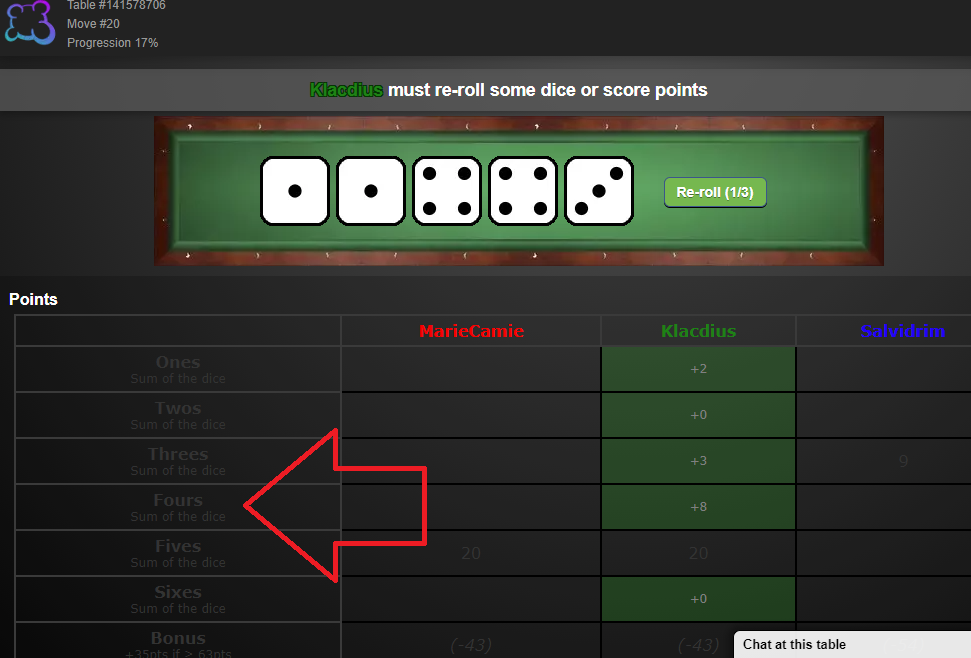
- Untitled.png (207.83 KiB) Viewed 1701 times
Re: Dark mode themes (CSS)...here you go
Posted: 23 January 2021, 08:07
by kolofardos
Nice work!
Here is a bug I found. When using these themes, the "Collapse" button disappears. The "Collapse" button should be visible when you select Play, simple game, manual, after selecting a game.
At the same page, the "Play now" / "Available tables" button are missing, below each game
Re: Dark mode themes (CSS)...here you go
Posted: 26 March 2021, 13:22
by CB Droege
Cards are nearly unreadable in the new game (currently in Alpha) "Fluxx". Card text is white on white.
Is there anybody who knows this?
Posted: 12 May 2021, 17:01
by Tun 1980
Thank you for your wonderful work. This has to be default option of bga. But there is a problem at Hardback game. You can not see scores (i have added as attachment) I hope somebody knows how to fix these two Hardback game problems:
1) We have to remove background images from score area
2) change font color and size.
Thank you.
Re: Dark mode themes (CSS)...here you go
Posted: 13 May 2021, 11:26
by GreatLands
Replies to posts on group pages weren't readable for Variant #1: Black dark mode. I copied the following from your welcome-module to apply to the group-module.
Code: Select all
#group-module .comment {
background-image:none;
background-color:rgba(245,245,245,.15);
border-radius:6px;
}
Re: Dark mode themes (CSS)...here you go
Posted: 24 May 2021, 04:25
by Paul 3
For some reason the code in the original post doesn't work on my android app. I assume the css was written for the web browser, so I may have to tinker with it to get it to work on my phone.
Re: Dark mode themes (CSS)...here you go
Posted: 24 June 2021, 07:32
by asfasfoejif2089
Wow! These look great! You could say they're... A game changer....

Re: Dark mode themes (CSS)...here you go
Posted: 09 July 2021, 00:35
by JoeSondow
Thanks for the great work! I'm using the latest black version from the edited initial post in this thread, and I love it. I play Can't Stop a lot, so I appreciate the edit that made the black text somewhat more readable in that game. For my own use I've added this CSS line to make that text white instead. I propose adding this to the dark mode CSS blobs as well. It doesn't appear to have any undesired consequences.
Re: Dark mode themes (CSS)...here you go
Posted: 30 August 2021, 01:07
by sheppo
This is wonderful, thank you.
Could you suggest a way to add an exception for certain game backgrounds? For example, Agricola uses a grassy field as its background which blends with the game board icons. It's playable with the dark mode background, but it looks kind of odd.
