Page 1 of 1
Missing Player Information Panel
Posted: 28 September 2018, 03:41
by AmadanNaBriona
In my game, I have set up the .tpl file according to the tutorials, and I have the basic layout displaying after I start the game, including cards dealt to each player.
However, I am missing the player information panel that goes with every game. I cannot figure out what I inadvertently removed, or did not include, in either my tpl file or my view.php file.
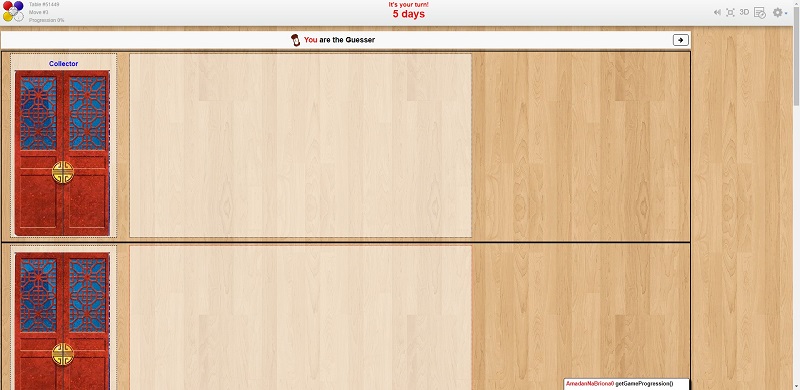
- ladytiger-noplayers.jpg (97.19 KiB) Viewed 3007 times
Re: Missing Player Information Panel
Posted: 08 October 2018, 03:49
by AmadanNaBriona
Still have not figured this out. I have looked at several games to see how it's done. So using a couple of other examples, I put this in the <script> section at the bottom of my .tpl file:
Code: Select all
var jstpl_player_panel = '\
  <div class="player_info">\
      <p>FOO</p>\
  </div>';
(Note: Just a stub, all I want is to see the word "FOO" just to verify something is being inserted...)
In my JS file, in the setup function:
Code: Select all
            // Setting up player boards
            for( var player_id in gamedatas.players )
            {
                dojo.place(this.format_block('jstpl_player_panel', {'player_id':player_id}), $('player_board_' + player_id));
                console.log("placing block for " + player_id);
            }
It doesn't work - I see the log statement output, but nothing appears on my board. What element am I missing?
I also went through the
hearts tutorial, and I swear I cannot find the code anywhere that inserts this:
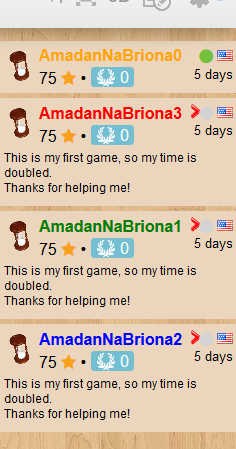
- Hearts_screenshot.png (43.82 KiB) Viewed 2997 times
I'm sure I'm missing something very basic, but thanks for any help.
Re: Missing Player Information Panel
Posted: 08 October 2018, 04:05
by AmadanNaBriona
Okay, so I'm kind of an idiot. Immediately after posting the above, I found that the player board is indeed appearing, but in the far lower right of my screen:
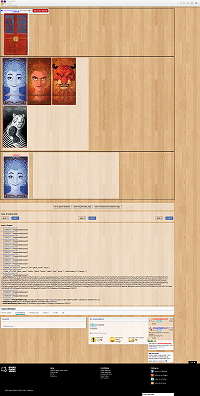
- ss2.png (149.85 KiB) Viewed 2997 times
So, I'm still at a loss as to where I went wrong in my css or tpl file. How do I get it to be placed up in the right margin, where it should be?
Re: Missing Player Information Panel
Posted: 08 October 2018, 18:33
by DrKarotte
The player panels are created by the framework, but apparently this is not the case in your project.
I suggest to remove your code and then add the elements piece by piece (or start a new project).
Re: Missing Player Information Panel
Posted: 08 October 2018, 21:48
by AmadanNaBriona
DrKarotte wrote:The player panels are created by the framework, but apparently this is not the case in your project.
I suggest to remove your code and then add the elements piece by piece (or start a new project).
Look in the lower right of the last image I posted. Turns out the player panels
are being created. I am just not sure why they're being stuck down in the lower right corner on top of the BGA footer info.
Re: Missing Player Information Panel
Posted: 08 October 2018, 23:24
by DrKarotte
I didn't see this second post when writing my reply, sorry. Nevertheless, in a game I had started I could not see anything at the bottom (I just tried again).
I probably have found the solution:
Change the "<div>" in line 53 of your TPL file to "</div>" (closing of div id "psouth".
Re: Missing Player Information Panel
Posted: 17 August 2019, 18:33
by AmadanNaBriona
DrKarotte wrote: ↑08 October 2018, 23:24
I didn't see this second post when writing my reply, sorry. Nevertheless, in a game I had started I could not see anything at the bottom (I just tried again).
I probably have found the solution:
Change the "<div>" in line 53 of your TPL file to "</div>" (closing of div id "psouth".
This is really late, but I just resumed working on this project, and only now saw your reply from back then. You're absolutely correct. Very belated thanks!
Re: Missing Player Information Panel
Posted: 17 August 2019, 22:10
by DrKarotte
You are welcome. Glad that I could help!
