You can create the illusion of depth with the css .box-shadow property, and you can use a custom zone to represent 3d height. Here's an example:
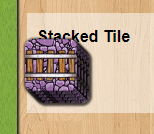
- Stacked Tile Example.png (28.82 KiB) Viewed 620 times
in my .tpl file, I have the following:
Code: Select all
<div id="zone_test" class="whiteblock otr_action_pallette">
    <h3>Stacked Tile</h3>
    <div id="stacked_tile_zone">
    </div>
</div>
and under Javascript HTML templates in the same file:
Code: Select all
var jstpl_track_on_board='<div class="otr_track_on_board" id="tob${track_pos}"></div>';
then in my .js file in the setup function I define the zone and place some elements into it:
Code: Select all
this.my_zone = new ebg.zone();
this.my_zone.create( this, $('stacked_tile_zone'), 52, 52 );
this.my_zone.setPattern( 'custom' );

this.my_zone.itemIdToCoords = function( i, control_width ) {
    let off_x = i*-3;
    let off_y = i*-3;
    return { x: off_x, y: off_y, w:52, h:52 };
};

for ( let tile_id = 0; tile_id < 5; tile_id++ ) {
    dojo.place( this.format_block( 'jstpl_track_on_board' , {
        track_pos: '_'+tile_id
    } ) , 'stacked_tile_zone' );
    this.my_zone.placeInZone ( 'tob_'+tile_id, tile_id );
    dojo.addClass( 'tob_'+tile_id, 'otr_track_space_placed' );
}
Then the magic happens in .css, where the following classes are defined:
Code: Select all
.otr_action_palette {
    display:inline-block;
    width: 340px;
}

.otr_track_on_board {
    width: 52px;
    height: 52px;
    border-radius: 8px;
    position: absolute;
    transform-origin: center;
    background-image:url('img/track.jpg');
    background-size: 208px 416px;
}

.otr_track_space_placed {
    border-radius: 8px;
    box-shadow: 1px 1px 2px 1.5px #000000aa;
}
The border-radius puts a rounded corner on the tiles, and the box-shadow could be in the .otr_track_on_board class for this particular example.
In my project, these tiles can rotate, so I usually put the shadow in a parent div so the shadow doesn't rotate with them. I just added the shadow class directly to the tiles in the zone for this example.