Page 1 of 2
Translating texts with multiple contexts
Posted: 15 June 2022, 06:24
by ufm
Is there any way to separate same texts as different contexts, either on BGA main site or a game?
e.g. Now bug headers can be translated.
However, 'open' has already been used in game lobby and BGA translation treats both 'open's the same.
Re: Translating texts with multiple contexts
Posted: 15 June 2022, 08:55
by Een
There is one translation context per game and one translation context for the mainsite.
So it's currently not possible to have two different translations for two identical strings on the mainsite.
Re: Translating texts with multiple contexts
Posted: 28 June 2022, 15:56
by KongKing123
Een wrote: ↑15 June 2022, 08:55
There is one translation context per game and one translation context for the mainsite.
So it's currently not possible to have two different translations for two identical strings on the mainsite.
In that case I propose slightly changing this game lobby string to "Open table", so "Open" is only used as an adjective.
Re: Translating texts with multiple contexts
Posted: 29 June 2022, 10:16
by Een
KongKing123 wrote: ↑28 June 2022, 15:56
In that case I propose slightly changing this game lobby string to "Open table", so "Open" is only used as an adjective.
This label is used on the table in the lobby with other buttons on the right ([Open] [Configure] [Quit]). Space is essential there, and context of the table is implicit from the container for these buttons being the table block. So I don't think it would be a good to change the game lobby string.
If something really needs changing, it would be easier (and impacting a much less visible part of the website) to change the label for the bug status (from "Open" to "Opened" for example, if there is no better suggestion).
Re: Translating texts with multiple contexts
Posted: 29 June 2022, 18:54
by KongKing123
Een wrote: ↑29 June 2022, 10:16
If something really needs changing, it would be easier (and impacting a much less visible part of the website) to change the label for the bug status (from "Open" to "Opened" for example, if there is no better suggestion).
I believe "Awaiting", "Unconfirmed", "Pending" or "Raised" would fit the context better and sound more grammatically correct.
Re: Translating texts with multiple contexts
Posted: 29 June 2022, 23:45
by fruktansvärt
there's already an "awaiting". not sure what the difference from "open" is.
perhaps:
"open": the bug report has been opened by a user, no developer has interacted with it.
"awaiting": a developer has seen the report, but didn't do anything about it.
yes?
so, "opened" seems good as an alternative to "open".
Re: Translating texts with multiple contexts
Posted: 30 June 2022, 09:12
by Een
"Pending" would work I think. But while checking this, I see that while a translatable term has been used in the filter, "raw" technical status is still displayed elsewhere, which makes the filter inconsistent with the display. Easiest fix is to display the "raw" status also in the filter for consistency.
Re: Translating texts with multiple contexts
Posted: 30 June 2022, 14:21
by KongKing123
fruktansvärt wrote: ↑29 June 2022, 23:45
there's already an "awaiting". not sure what the difference from "open" is.
perhaps:
"open": the bug report has been opened by a user, no developer has interacted with it.
"awaiting": a developer has seen the report, but didn't do anything about it.
yes?
"Open" is for bugs (red) and "awaiting" for suggestions (yellow). It might look strange to have the same status be coloured differently, though I don't see a huge problem with using "awaiting" for both.
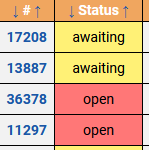
- https://boardgamearena.com/bugs
- Report statuses.PNG (4.69 KiB) Viewed 901 times
fruktansvärt wrote: ↑29 June 2022, 23:45
so, "opened" seems good as an alternative to "open".
It sort of works, but it's a grammatical stretch. The report is "open", not "opened":
https://dictionary.cambridge.org/gramma ... -or-opened
Een wrote: ↑30 June 2022, 09:12
"Pending" would work I think. But while checking this, I see that while a translatable term has been used in the filter, "raw" technical status is still displayed elsewhere, which makes the filter inconsistent with the display. Easiest fix is to display the "raw" status also in the filter for consistency.
It's probably best to display both then: "Bug | awaiting ([translation of awaiting])".
On a related note, the full status explanation doesn't seem particularly essential to have in the combobox itself, since it makes it very large and a bit crowded for a filter.
Re: Translating texts with multiple contexts
Posted: 04 July 2022, 01:53
by cigma
Een wrote: ↑15 June 2022, 08:55
There is one translation context per game and one translation context for the mainsite.
So it's currently not possible to have two different translations for two identical strings on the mainsite.
I have found out that there are two text modules with the identical string "Translate Board Game Arena", one has only Translationhq as context, the other has Translationhq and Translation as context. It looks like they can be translated differently. Now I am wondering if this contradicts what Een has said. Maybe one of these text modules is not used, and Een refers only to active text modules?

Re: Translating texts with multiple contexts
Posted: 04 July 2022, 09:25
by Een
cigma wrote: ↑04 July 2022, 01:53
Een wrote: ↑15 June 2022, 08:55
There is one translation context per game and one translation context for the mainsite.
So it's currently not possible to have two different translations for two identical strings on the mainsite.
I have found out that there are two text modules with the identical string "Translate Board Game Arena", one has only Translationhq as context, the other has Translationhq and Translation as context. It looks like they can be translated differently. Now I am wondering if this contradicts what Een has said. Maybe one of these text modules is not used, and Een refers only to active text modules?
No contradiction, just some confusion about semantics

Context as provided under the string in the translation module is there to help translators choose the right translation according to the context(s) where the string is used used (basically, it gives an indication about the page where this string displays). It's just informative.
Context as I mentioned is the technical context used for translation files using gettext (
https://www.gnu.org/software/gettext/), and it's not linked to the informative contexts displayed in any way. We have one for the mainsite, and one per game ; we have no plans currently to split the mainsite context into multiple separate contexts as it would be challenging and collisions have been rare.