Page 1 of 1
HELP : comment insérer une image dans un post
Posted: 23 March 2023, 18:07
by Hagardunor
Je ne sais pas si c'est le bon endroit pour en discuter, mais j'aimerais savoir s'il est possible d'insérer une image dans un post, et si oui comment.
Merci d'avance
Re: HELP : comment insérer une image dans un post
Posted: 23 March 2023, 19:09
by Blacktango

Yes, you need to get the image online : if you find it, just copy their url (ex:
https://some-website.com/images/the-image-i-want.png)
Then, when you write your forum post, use the “Insert image” button and paste the URL between the image tags
Code: Select all
[img]https://some-website.com/images/the-image-i-want.png[/img]
If your image is not online yet (ex: it’s on your computer/device), you can host it on a website like
https://postimages.org.
Upload it and copy-paste the “Direct link” URL (ex:
https://i.postimg.cc/qBndHP7d/IMG-20230227-153022.jpg) in the forum post like explained before.
Re: HELP : comment insérer une image dans un post
Posted: 24 March 2023, 19:51
by Hagardunor
fine !!!

But what can I do if I want to upload one of the images on my computer ?
Re: HELP : comment insérer une image dans un post
Posted: 24 March 2023, 20:51
by Blacktango
Re: HELP : comment insérer une image dans un post
Posted: 24 March 2023, 22:08
by Yorgad
You can also upload an image from your computer as long as it does not exceed 512 Ko.
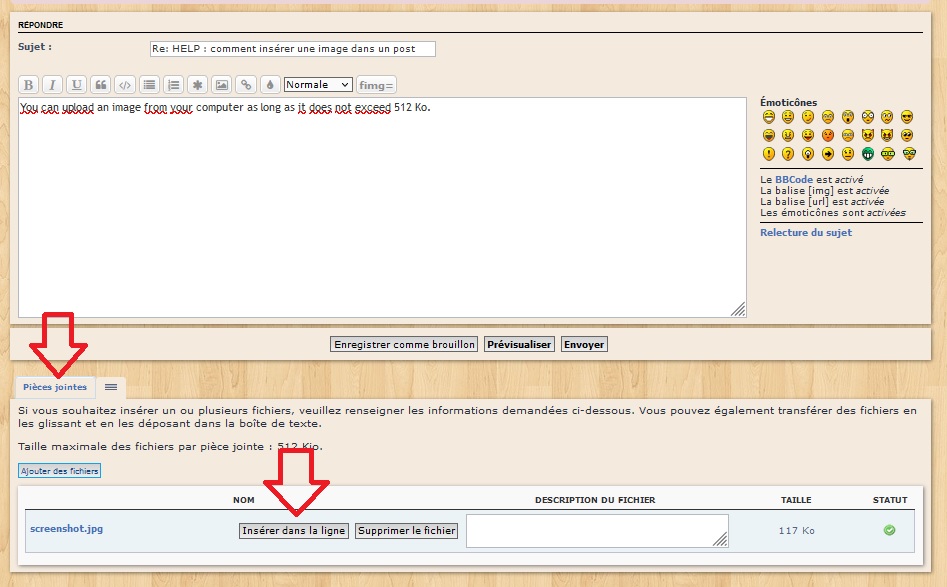
- screenshot.jpg (124.85 KiB) Viewed 832 times
Cheers,
Y.
Re: HELP : comment insérer une image dans un post
Posted: 24 March 2023, 23:38
by Blacktango
Oh, thanks for the tips, I didn’t notice!

Re: HELP : comment insérer une image dans un post
Posted: 28 March 2023, 18:40
by Hagardunor
Many thaks for the tip