Page 1 of 2
Elfenland : can't go through the tutorial
Posted: 23 October 2023, 23:02
by Hagardunor
I am stuck at the step presented on the screenshot below. I can select the tile, but it is impossible to put it on the desert path.
Is it me only or what ?
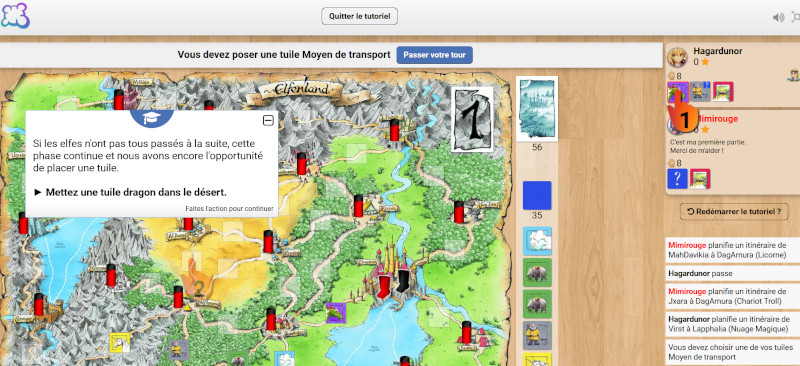
- elfenland tuto capture-800px.jpg (146.8 KiB) Viewed 531 times
Re: Elfenland : can't go through the tutorial
Posted: 24 October 2023, 02:05
by nik592
It could be a bug in the tutorial. That said, tutorials can be very finicky about doing things in the right order. If you misclick and then try to correct it, it sometimes doesn't accept it. I'd suggest quitting and restarting the tutorial and if it happens again (and you're sure you didn't misclick), you can message the person who made the tutorial about it. Or possibly raise a bug, but I'm not sure if bug reports are strictly for tutorials.
Re: Elfenland : can't go through the tutorial
Posted: 24 October 2023, 21:36
by Hagardunor
nik592 wrote: ↑24 October 2023, 02:05
It could be a bug in the tutorial. That said, tutorials can be very finicky about doing things in the right order. If you misclick and then try to correct it, it sometimes doesn't accept it. I'd suggest quitting and restarting the tutorial and if it happens again (and you're sure you didn't misclick), you can message the person who made the tutorial about it. Or possibly raise a bug, but I'm not sure if bug reports are strictly for tutorials.
In fact, I tried that maneuver 2 or 3 times, and the tutorial always bugs at the same step
Re: Elfenland : can't go through the tutorial
Posted: 25 October 2023, 07:43
by cigma
Please contact the author of the tutorial. Bug reports for a game are meant for the game developer only.
Re: Elfenland : can't go through the tutorial
Posted: 25 October 2023, 16:36
by Hagardunor
cigma wrote: ↑25 October 2023, 07:43
Please contact the author of the tutorial. Bug reports for a game are meant for the game developer only.
Who is the game developer ?
Re: Elfenland : can't go through the tutorial
Posted: 26 October 2023, 02:12
by nik592
You don't need to contact the game developer, you need to contact the author of the tutorial, which is usually noted at the start of the tutorial.
Re: Elfenland : can't go through the tutorial
Posted: 26 October 2023, 09:53
by Nastaa
Hi, I'm the author of this tuto. I'm sorry that you are stuck. Does the mouse recognize when you go over the road? Does reducing the comment window help?
I re-tested while varing a few things, but for me it always works (I tried on different devices, different languages, tried to misclick: I get errors but the tutorial does not lock), so if the reducing does not work I really don't understand what can be the issue. Maybe someone else has an idea? (If someone wants to test, here is the link it:
https://boardgamearena.com/tutorial?gam ... orial=1172)
Thank you for the feedback, I hope this gets figured out.
Re: Elfenland : can't go through the tutorial
Posted: 26 October 2023, 15:47
by Hagardunor
Nastaa wrote: ↑26 October 2023, 09:53
Hi, I'm the author of this tuto. I'm sorry that you are stuck. Does the mouse recognize when you go over the road? Does reducing the comment window help?
I re-tested while varing a few things, but for me it always works (I tried on different devices, different languages, tried to misclick: I get errors but the tutorial does not lock), so if the reducing does not work I really don't understand what can be the issue. Maybe someone else has an idea? (If someone wants to test, here is the link it:
https://boardgamearena.com/tutorial?gam ... orial=1172)
Thank you for the feedback, I hope this gets figured out.
I tested again, and I still continued to be stuck, and the mouse did not recognize the road when hovering above it.
Happily your second recommendation works

When I reduced the comment I could resume running the tutorial
Unhappily, I get stuck again some comments after : the last one calls to select a dragon, but there is no dragon in the hand (see below). Instead there is a troll cart, that I can click but cannot put on the destination indicated by finger 2 (by the way there is no finger 1)
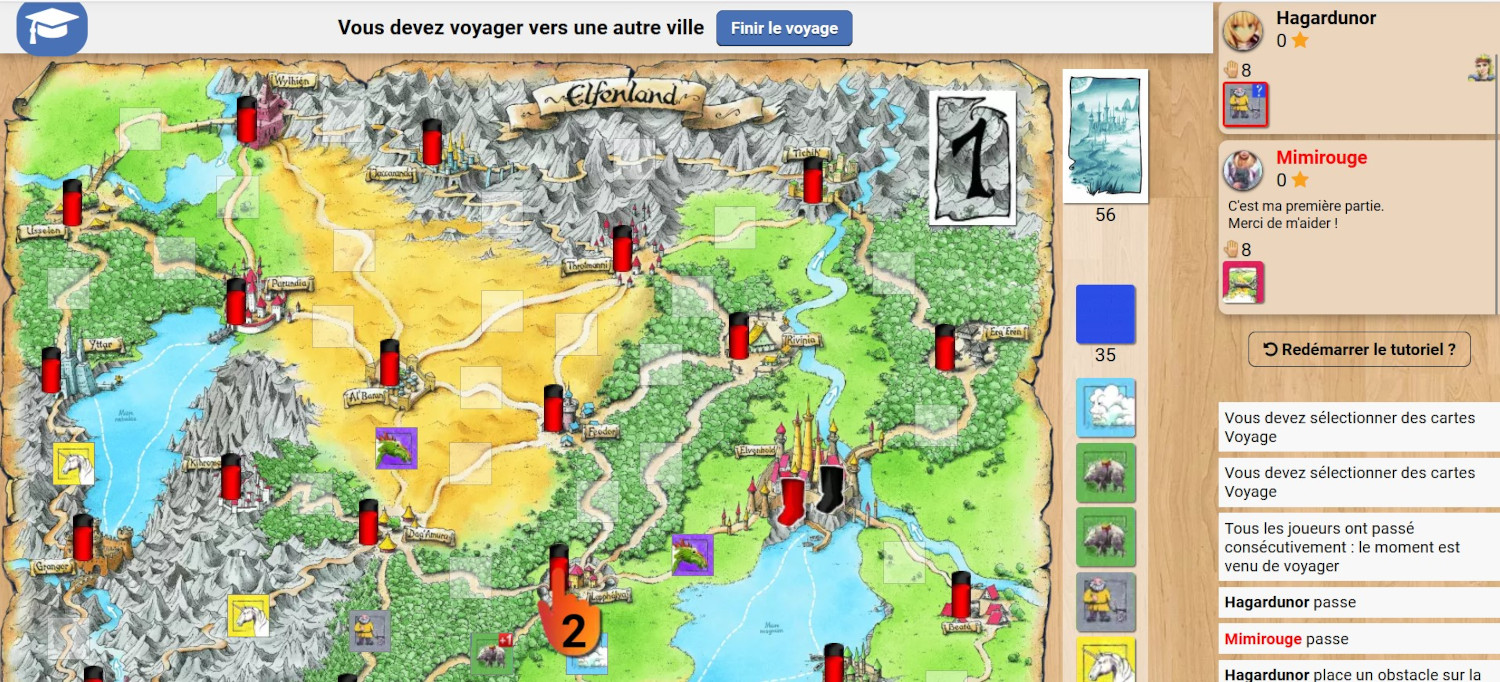
- le dragon - chariot troll est cliquable mais pas jouable-1500px.jpg (430.41 KiB) Viewed 354 times
Re: Elfenland : can't go through the tutorial
Posted: 26 October 2023, 15:52
by RicardoRix
I have an idea on what might be happening.
I did not get stuck in the desert, but I did get stuck later trying to place the obstacle tile.
As a fix, I minimizsed the tutorial text (goes down to just a blue/white hat icon), and then I could placed the tile as instructed.
I believe it's the 'tutorial text' that is covering the active area where you need to click.
https://imgur.com/a/36C1iBG
The height of the element is too large as far as I can tell.
It's 515px, and should be 225px. It blocks any iteration with the underlying page.
I'm running chrome browser on Windows10.
---------
I notice in your 2nd screenshot the text in minimised already. Maybe it's the red hand blocking...??
You can open F12 and 'Inspect' (and maybe delete) to try and find the blocking element.
Re: Elfenland : can't go through the tutorial
Posted: 26 October 2023, 19:52
by Nastaa
Thank you for your perserverance Hagardunor! It's good to have feedback, otherwise I don't really know if people are stopping the tutorial because of an issue I can help with or because of other reasons like changed their mind, got a connection problem or whatever reason.
Hagardunor wrote: ↑26 October 2023, 15:47
I tested again, and I still continued to be stuck, and the mouse did not recognize the road when hovering above it.
Happily your second recommendation works
When I reduced the comment I could resume running the tutorial
Good, this part is figured out
The need to minimize the tutorial comments comes often in tutorials (even more for mobile users). The thing is when to use it depends very much on the size of the screen, so often it is let to the user to decide when (I have seen tutorials where the author actually mention to not do it at some steps because of a bug). I thought the default message at the beginning of the tuto plus some reminders at key places would be enough, it may not. Any thoughts on that?
Hagardunor wrote: ↑26 October 2023, 15:47
Unhappily, I get stuck again some comments after : the last one calls to select a dragon, but there is no dragon in the hand (see below). Instead there is a troll cart, that I can click but cannot put on the destination indicated by finger 2 (by the way there is no finger 1)
le dragon - chariot troll est cliquable mais pas jouable-1500px.jpg
I think maybe you are clicking on a tile instead of a card. Cards from your hand should be under the map (not included in your screenshot), unlike your tiles that are on the player's info in the right of your screen.
RicardoRix wrote: ↑26 October 2023, 15:52
I have an idea on what might be happening.
I did not get stuck in the desert, but I did get stuck later trying to place the obstacle tile.
As a fix, I minimizsed the tutorial text (goes down to just a blue/white hat icon), and then I could placed the tile as instructed.
I believe it's the 'tutorial text' that is covering the active area where you need to click.
https://imgur.com/a/36C1iBG
The height of the element is too large as far as I can tell.
It's 515px, and should be 225px. It blocks any iteration with the underlying page.
I'm running chrome browser on Windows10.
---------
I notice in your 2nd screenshot the text in minimised already. Maybe it's the red hand blocking...??
You can open F12 and 'Inspect' (and maybe delete) to try and find the blocking element.
Thank you RicardoRix for trying the tuto and for your suggestion, I see the developer debugging here

I don't expect many users will use the F12 trick to follow a tutorial, but it's a cool trick for me to help figure out what is happening in some cases