Page 1 of 1
Survey in some foreign language
Posted: 12 June 2026, 14:28
by hammerin
so I could not take it
Re: Survey in some foreign language
Posted: 12 June 2026, 17:38
by The-True-KingofTokyo
Not sure if this helps you, but many phones have a live translation feature for what's on your screen.
If you have access to a Samsung S series you can just push and hold the home button and it gives you the option.
And the language was likely French, as the site staff is from France.
"Some foreign language" made me lol

Re: Survey in some foreign language
Posted: 12 June 2026, 18:01
by Jellby
It's actually "some local language"

Re: Survey in some foreign language
Posted: 12 June 2026, 19:24
by Meeplelowda
First I laughed, then I cringed. You don't have to speak French fluently to be able to recognize it.
Re: Survey in some foreign language
Posted: 12 June 2026, 20:52
by Jellby
To be fair, I'm pretty sure the OP simply meant "a language different from the one I have specified in my preferences". I don't assume they don't know which language it is, just that it's irrelevant for their point (and I can't know which language they received the survey in). I also don't assume they believe other languages are somehow weird or wrong, just that if there's a preference for the site language and communications, it should be honoured.
Re: Survey in some foreign language
Posted: 13 June 2026, 20:30
by AstridEs
If you're on desktop you can select and right click the text > translate to English.
Re: Survey in some foreign language
Posted: 13 June 2026, 20:47
by Jellby
AstridEs wrote: ↑13 June 2026, 20:30
If you're on desktop you can select and right click the text > translate to English.
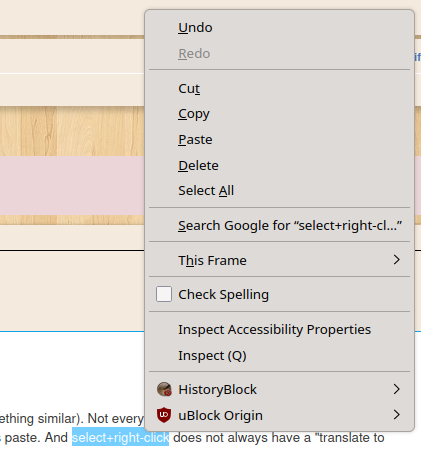
Only if they're using your computer, your browser and your user account (or something similar). Not every browser is the same and not every user configuration is the same. F5 does not always reload and Ctrl+V does not always paste. And select+right-click does not always have a "translate to English" (I bet even right-click doesn't always show a menu)