Color Blind Reminder

Game development with Board Game Arena Studio
User avatar
Varagon
Posts: 3
Joined: 09 October 2015, 05:48

Color Blind Reminder

Post by Varagon »

Hi, all,
I want to send out a reminder to help with those players who are color blind. When hovering over resources or color coded locations, it would be AWESOME if you could label those things. For example, don't just tell me I can buy the selected resources, but say, you can buy the selected gold, copper, and bananas.

Thanks for the consideration. Being colorblind really puts me at a deficit in a lot of games that don't label the things I need to interact with. Thanks!
User avatar
Shazzypaz
Posts: 98
Joined: 27 December 2020, 15:22

Re: Color Blind Reminder

Post by Shazzypaz »

It's a good reminder :-) I think that adding visual distinctions such as overlaid shapes is better than adding tooltips. Needing to hover all of the time must disrupt the flow of the game. In the game that I recently completed (Kingdoms) I added shapes to the corners of the cards - they can be turned on in the user preferences.
User avatar
Varagon
Posts: 3
Joined: 09 October 2015, 05:48

Re: Color Blind Reminder

Post by Varagon »

Varagon wrote: 10 December 2022, 20:06 Hi, all,
I want to send out a reminder to help with those players who are color blind. When hovering over resources or color coded locations, it would be AWESOME if you could label those things. For example, don't just tell me I can buy the selected resources, but say, you can buy the selected gold, copper, and bananas.

Thanks for the consideration. Being colorblind really puts me at a deficit in a lot of games that don't label the things I need to interact with. Thanks!
Definitely! I'm currently playing Palaces of Carrera and identifying which blocks I have purchased or are on the rondel is hard (they reduce in price by 1 gold each turn of the rondel so I can click on them to see a price), but it's time consuming, adds additional steps, etc. But, if I can hover to get a label or see a specific shape that would be amazing. This isn't eh only game I have had problems with on BGA. The digital designers do amazing jobs, though, and I applaud all the work they do.
User avatar
junibegood
Posts: 49
Joined: 25 November 2016, 21:12

Re: Color Blind Reminder

Post by junibegood »

As a tip for fellow developers, on this subject : you can find browser extensions that will allow you to simulate how a page looks like for someone suffering from one of the types of color blindness. A good example of such extension, for Firefox, is this one : https://addons.mozilla.org/en-US/firefo ... lor-blind/ (I'm sure you can find quality extensions for other browsers as well)

On BGA, we are often limited in color choices because we're here to reproduce as closely as possible a physical game, but you may have to pick colors for UI elements that are specific to the digital adaptation. An extension like this helps in picking a color that will be easier to distinguish from those of other elements around it.
User avatar
Shobu
Posts: 584
Joined: 04 January 2020, 04:14

Re: Color Blind Reminder

Post by Shobu »

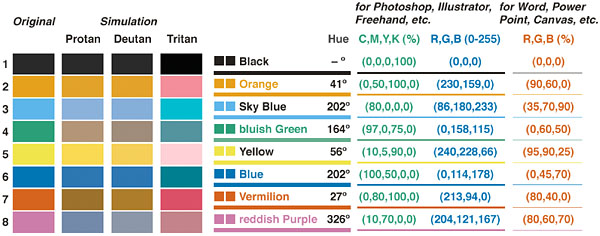
This universal color set is pretty great (some website use that for their cardgames), could be great if it could be used for player's color:
https://jfly.uni-koeln.de/color/

Image
mrangjunboon2019
Posts: 3
Joined: 09 November 2022, 03:50

Re: Color Blind Reminder

Post by mrangjunboon2019 »

👍🏿
User avatar
Tof63
Posts: 582
Joined: 24 March 2020, 20:25

Re: Color Blind Reminder

Post by Tof63 »

Varagon wrote: 10 December 2022, 20:06 Hi, all,
I want to send out a reminder to help with those players who are color blind. When hovering over resources or color coded locations, it would be AWESOME if you could label those things. For example, don't just tell me I can buy the selected resources, but say, you can buy the selected gold, copper, and bananas.

Thanks for the consideration. Being colorblind really puts me at a deficit in a lot of games that don't label the things I need to interact with. Thanks!
Hi!

Could you please have a look to https://boardgamearena.com/gamepanel?ga ... reflection ?
I'm not sure there is an issue for colorblinds in the game, but anyway I added a mode that adds stripes to differentiate certain colors.
Can you tell me if this is useful or not?
User avatar
Shazzypaz
Posts: 98
Joined: 27 December 2020, 15:22

Re: Color Blind Reminder

Post by Shazzypaz »

For Reflection - did you also deal with the red and green colors at the end that show your mistakes and where the pieces should have been placed? As someone who is not color blind, I even have difficulty with the current colors.
User avatar
Varagon
Posts: 3
Joined: 09 October 2015, 05:48

Re: Color Blind Reminder

Post by Varagon »

Shazzypaz wrote: 14 December 2022, 14:43 For Reflection - did you also deal with the red and green colors at the end that show your mistakes and where the pieces should have been placed? As someone who is not color blind, I even have difficulty with the current colors.
I'm not sure what I understand.
User avatar
Tof63
Posts: 582
Joined: 24 March 2020, 20:25

Re: Color Blind Reminder

Post by Tof63 »

Shazzypaz wrote: 14 December 2022, 14:43 For Reflection - did you also deal with the red and green colors at the end that show your mistakes and where the pieces should have been placed? As someone who is not color blind, I even have difficulty with the current colors.
You are talking about the display of the solution when you give up ?
I added a button "solution only" on this screen that allow you to switch between the display you are describing and the display of the solution without your items.
Post Reply

Return to “Developers”