I just instakked it, and can see how to remove general messages or switch from light to dark mode (neither of which I care about), but not to remove items like the recommended games. Can you explain how to do this? (I'm using Edge.)Tof63 wrote: ↑23 July 2024, 07:58 This browser extension https://chromewebstore.google.com/detai ... imepllkacb allow you to customize the home page, and remove all items that you don't want. (Compatible with Google Chrome, Edge, Brave, and even with Kiwi Browser for Android devices)
💫 Welcome to the new BGA Homepage!
-
GeraldineMerida
- Posts: 360
- Joined: 15 December 2020, 07:27
Re: 💫 Welcome to the new BGA Homepage!

Re: 💫 Welcome to the new BGA Homepage!
You should click on the icon of the extension in the upper right side of your browser. It may be hidden by default but you can force the browser to always show it. Tell me if you dont find it...GeraldineMerida wrote: ↑23 July 2024, 23:39I just instakked it, and can see how to remove general messages or switch from light to dark mode (neither of which I care about), but not to remove items like the recommended games. Can you explain how to do this? (I'm using Edge.)Tof63 wrote: ↑23 July 2024, 07:58 This browser extension https://chromewebstore.google.com/detai ... imepllkacb allow you to customize the home page, and remove all items that you don't want. (Compatible with Google Chrome, Edge, Brave, and even with Kiwi Browser for Android devices)
The complete list of features is here : https://en.doc.boardgamearena.com/ChromeExtension
-
GeraldineMerida
- Posts: 360
- Joined: 15 December 2020, 07:27
Re: 💫 Welcome to the new BGA Homepage!
OK, I now have the icon showing up and was able to disable some of the stuff I don't want, but even though I have set it to new games hidden, recommended games hidden and popular games hidden, it is showing me giant banners of the new games (covering maybe 80% of my screen). Do I have to have at least one of the three?

Re: 💫 Welcome to the new BGA Homepage!
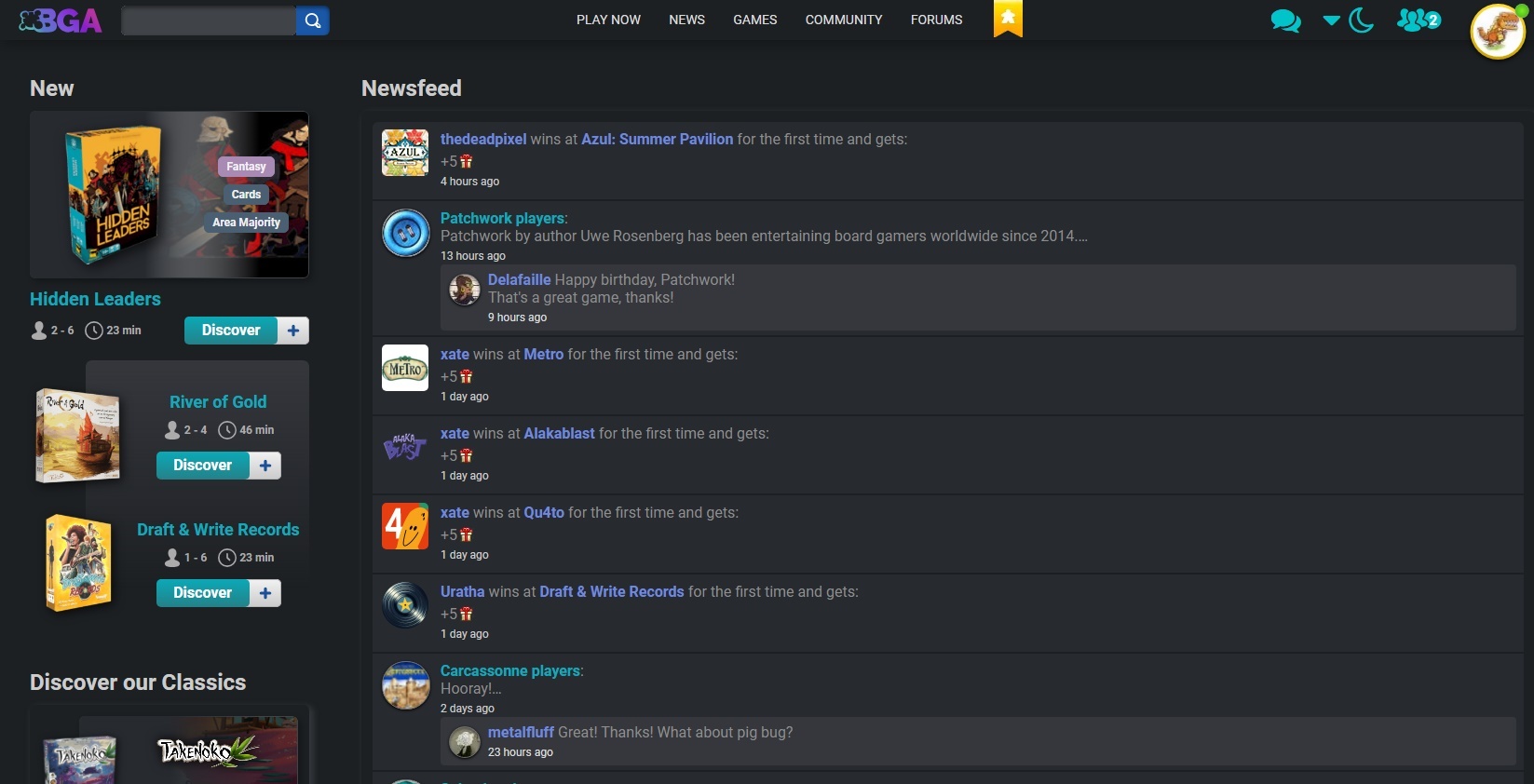
You need to turn the "header" off or you see the giant banner.GeraldineMerida wrote: ↑24 July 2024, 01:05 OK, I now have the icon showing up and was able to disable some of the stuff I don't want, but even though I have set it to new games hidden, recommended games hidden and popular games hidden, it is showing me giant banners of the new games (covering maybe 80% of my screen). Do I have to have at least one of the three?
When you've turned off enough options, you should see something like this:
-
GeraldineMerida
- Posts: 360
- Joined: 15 December 2020, 07:27
Re: 💫 Welcome to the new BGA Homepage!
I had turned header off already, but just resized my news feed, which gave me a similar outcome to yours. However, I can't stop new games showing up, even though I've disabled them. They are just smaller now.
I would really like just to be able to see my news feed, my tournaments, and the achievements boxes.
I would really like just to be able to see my news feed, my tournaments, and the achievements boxes.
Re: 💫 Welcome to the new BGA Homepage!
I see. That might be something to request in the extension thread, depending on how difficult it is to implement.GeraldineMerida wrote: ↑24 July 2024, 02:10 I had turned header off already, but just resized my news feed, which gave me a similar outcome to yours. However, I can't stop new games showing up, even though I've disabled them. They are just smaller now.
I would really like just to be able to see my news feed, my tournaments, and the achievements boxes.
-
GeraldineMerida
- Posts: 360
- Joined: 15 December 2020, 07:27
Re: 💫 Welcome to the new BGA Homepage!
Yes, I recognise it might not be easy to achieve, but the comment earlier about being able to remove "everything you don't want" with this extension was misleading, as is the option in the extension to hide new games.
-
GeraldineMerida
- Posts: 360
- Joined: 15 December 2020, 07:27
Re: 💫 Welcome to the new BGA Homepage!
Anyway, thanks for your help @GTSchemer.
Re: 💫 Welcome to the new BGA Homepage!
I don't see any such option in the extension. There is an option to hide "Latest news", but that's different from the new games section. Hiding it is probably easy enough if Tof63 gets time.GeraldineMerida wrote: ↑24 July 2024, 03:07 Yes, I recognise it might not be easy to achieve, but the comment earlier about being able to remove "everything you don't want" with this extension was misleading, as is the option in the extension to hide new games.
Would you prefer the tournaments tab on the left, or below the news feed?
Re: 💫 Welcome to the new BGA Homepage!
Thanks GTSchemer, I confirm there is no such optionGTSchemer wrote: ↑24 July 2024, 03:13I don't see any such option in the extension. There is an option to hide "Latest news", but that's different from the new games section. Hiding it is probably easy enough if Tof63 gets time.GeraldineMerida wrote: ↑24 July 2024, 03:07 Yes, I recognise it might not be easy to achieve, but the comment earlier about being able to remove "everything you don't want" with this extension was misleading, as is the option in the extension to hide new games.
Would you prefer the tournaments tab on the left, or below the news feed?

@GeraldineMerida :
Sorry about the “everything”, I should have specified “almost everything”.
I really thought the available options were satisfying ...
Just a reminder, I'm not here to “ mislead ” people, I have nothing to gain from the extension being used. (I even spent a little money to have the right to publish one, in fact :p)
If you see anything you'd like to improve about the extension, you can come and talk to me about it on the dedicated thread: https://boardgamearena.com/forum/viewtopic.php?t=30509
If it's feasible in a reasonable time, seems interesting for users, and I feel the programming challenge will be fun to overcome, then there's a good chance I'll do it
