Google Chrome, Firefox & Opera Extension

Discussions about BGA (all languages)
Forum rules
Warning: challenging a moderation in Forum = 10 days ban
More info & details about how to challenge a moderation: viewtopic.php?p=119756
User avatar
Tof63
Posts: 582
Joined: 24 March 2020, 20:25

Re: Google Chrome and Firefox Extension

Post by Tof63 »

2000 weekly users for Christmas?

Image

;)
User avatar
nik592
Posts: 1390
Joined: 16 October 2022, 13:54

Re: Google Chrome and Firefox Extension

Post by nik592 »

Found another Dark Mode problem - the scoring table in Bunny Kingdom is unreadable. I'd suggest probably changing the scoring boxes to a colour better suited to the dark theme, so the lighter text shows up?

Image
User avatar
Tof63
Posts: 582
Joined: 24 March 2020, 20:25

Re: Google Chrome and Firefox Extension

Post by Tof63 »

nik592 wrote: 18 December 2024, 05:20 Found another Dark Mode problem - the scoring table in Bunny Kingdom is unreadable. I'd suggest probably changing the scoring boxes to a colour better suited to the dark theme, so the lighter text shows up?

Image
Thanks for the feedback!
I've spotted a few other issues in this game, the background is too dark and the players' names aren't very visible on their boards.
And a couple of other things I don't find very pretty...
I'll fix that for the next version!
User avatar
Tof63
Posts: 582
Joined: 24 March 2020, 20:25

Re: Google Chrome and Firefox Extension

Post by Tof63 »

Hello,

a new version is available with corrections for dark mode, for:
- Bunny Kingdom
- Ninjan
- Deliverance
- Quartz Dice
- Rift Force
- Codex Naturalis
- Splendor

Have a nice day!
User avatar
Tof63
Posts: 582
Joined: 24 March 2020, 20:25

Re: Google Chrome and Firefox Extension

Post by Tof63 »

Hello

a new version (1.10.17) has been published with corrections for dark mode, for:
- Zenith
- Kado
- Revive

An Internet user suggested a solution to limit the rights requested by the extension. Until now, the extension requested the right to block URLs from any site, but now it only requests the right to block URLs from boardgamearena.net and boardgamearena.com.
(Indeed, the extension blocks the loading of default background images when using the dark mode to avoid flickering effects when changing page, and the extension also redirects to the classic lobby when the option is configured).
In short, it's all in place in this version 1.10.17, and should go completely unnoticed by anyone who has already installed the extension.

This version is available for Firefox, and should be available in the next few hours for Chrome as soon as Google has approved it.

Have a nice day!
User avatar
buu441
Posts: 147
Joined: 12 March 2022, 06:52

Re: Google Chrome and Firefox Extension

Post by buu441 »

Turing Machine dark mode has some issues. The selected numbers of the code are not highlighted by the corresponding colors.
User avatar
Tof63
Posts: 582
Joined: 24 March 2020, 20:25

Re: Google Chrome and Firefox Extension

Post by Tof63 »

buu441 wrote: 23 December 2024, 17:22 Turing Machine dark mode has some issues. The selected numbers of the code are not highlighted by the corresponding colors.
Sorry but i don't know well this game, could you please send me a screenshot of the problem with imgur ?
User avatar
Tof63
Posts: 582
Joined: 24 March 2020, 20:25

Re: Google Chrome and Firefox Extension

Post by Tof63 »

I understood what the problem was with Turing Machine...

I hope you all had a good Christmas, I've just released version 1.10.18 and as I'll be on vacation next week it's the last version of the year!

This version improve dark mode for:
- Pax Pamir
- Ark Nova
- Ticket to Ride
- Terraforming Mars
- Orleans
- Turing Machine

And it enhances the overall text contrast on all buttons.

Edit:

I've asked for the extension to be added to the Opera store, but validation takes a very, very, long time (I've been waiting 1 month so far...).
If Opera users wish, they can install the extension manually via this URL: https://github.com/FlavienBusseuil/bga- ... .10.18.zip

Installations instructions :
- Unzip the extension in a folder on your computer
- Browse to opera://extensions
- Turn on developer mode
- Click on "Load Unpacked" and select the folder where you unziped the extension
User avatar
Blacktango
Posts: 537
Joined: 18 April 2015, 12:15

Re: Google Chrome and Firefox Extension

Post by Blacktango »

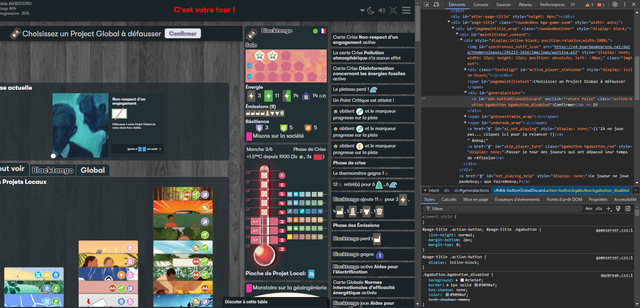
Hi, I found a little thing which could be improved for Daybreak.

Sometimes the game displays a top button to confirm or do some action. Some of them have a different color, which is not very well handled by the extension:

Image

IMO, the color of the text is not dark enough compared to the background, and it looks weird because the borders of the font use another color.
From the CSS, it looks like it happens when the button is disabled (waiting for the player to select something first).
The design doesn't really look like a disabled button as it should.


Thank you very much for your work! :D
User avatar
Tof63
Posts: 582
Joined: 24 March 2020, 20:25

Re: Google Chrome and Firefox Extension

Post by Tof63 »

Thanks for the report, I will fix this in next version!

Happy New Year to all!
Post Reply

Return to “Discussions”