Hello,
i'm using the stock component and want to change style if card_type_arg of some cards is identical. In my case it should be like shown on the stock documentation, but additionally i want, that all blue cards are next to the red cards (different type_arg) without any overlay.
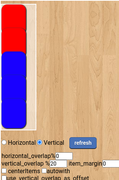
So I tried to use setupNewCard. But the change of "left" value has no effect, probably because it is overwritten afterwards. The new "position" value keeps alive...
------------------
setupNewCard: function ( card_div, card_type_id, card_id ) {
var cardCoords = dojo.marginBox (card_div);
var addedChoords = cardCoords.l + 30 + 'px';
console.log('added choords: ' + addedChoords);
dojo.style(card_div, {
"position": "relative",
"left": cardCoords.l + 30 + 'px'
});
console.log('Updated left value: ', dojo.style(card_div, "left"));
},
-------------------
Why has "left" no effect?
Even if I write a new function and set !important for that => no effect:
-------------------
arrangeCards: function(cards) {
let positions = {};
Object.values(cards).forEach(card => {
let cardElement = document.getElementById(this.myPlayertable.getItemDivId(card.id));
if (!positions[card.type_arg]) {
positions[card.type_arg] = {
left: parseInt(cardElement.style.left) || 0,
};
} else {
positions[card.type_arg].top += 30;
}
cardElement.style.left = positions[card.type_arg].left + 'px';
cardElement.style.setProperty("top", positions[card.type_arg].top + "px", "important");
console.log(`Updated top value for ${card.id}: `, positions[card.type_arg].top);
});
},
--------------------
The console logs every time the correct value, but it seems to be overwritten or something like that. Is there a way to do that with "stock" component?
i'm using the stock component and want to change style if card_type_arg of some cards is identical. In my case it should be like shown on the stock documentation, but additionally i want, that all blue cards are next to the red cards (different type_arg) without any overlay.
So I tried to use setupNewCard. But the change of "left" value has no effect, probably because it is overwritten afterwards. The new "position" value keeps alive...
------------------
setupNewCard: function ( card_div, card_type_id, card_id ) {
var cardCoords = dojo.marginBox (card_div);
var addedChoords = cardCoords.l + 30 + 'px';
console.log('added choords: ' + addedChoords);
dojo.style(card_div, {
"position": "relative",
"left": cardCoords.l + 30 + 'px'
});
console.log('Updated left value: ', dojo.style(card_div, "left"));
},
-------------------
Why has "left" no effect?
Even if I write a new function and set !important for that => no effect:
-------------------
arrangeCards: function(cards) {
let positions = {};
Object.values(cards).forEach(card => {
let cardElement = document.getElementById(this.myPlayertable.getItemDivId(card.id));
if (!positions[card.type_arg]) {
positions[card.type_arg] = {
left: parseInt(cardElement.style.left) || 0,
};
} else {
positions[card.type_arg].top += 30;
}
cardElement.style.left = positions[card.type_arg].left + 'px';
cardElement.style.setProperty("top", positions[card.type_arg].top + "px", "important");
console.log(`Updated top value for ${card.id}: `, positions[card.type_arg].top);
});
},
--------------------
The console logs every time the correct value, but it seems to be overwritten or something like that. Is there a way to do that with "stock" component?