How to swap the new design with the old one

Forum rules
Please DO NOT POST BUGS on this forum. Please report (and vote) bugs on : https://boardgamearena.com/#!bugs
LadyAmatheia
Posts: 2
Joined: 12 November 2021, 11:57

Re: How to swap the new design with the old one

Post by LadyAmatheia »

Thank you @CoreySteel for taking the time to make this, I'm glad I'm not the only one incredulous at the new design, and now the outrageous response from BGA.

Sadly, as I'm in the UK, imgur no longer works as freely accessible - would you consider finding a different/an additional hosting site? I appreciate that this is extra work, so understand if you'd prefer not to.

Thought you'd get a chuckle out of how it looks for me:
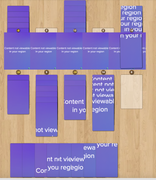
Image
User avatar
CoreySteel
Posts: 16
Joined: 31 May 2023, 21:59

Re: How to swap the new design with the old one

Post by CoreySteel »

That's funny. Still better than new design :lol: :lol:

I think Imgbb is still available for the UK, right?
If yes, here are the alternative links:

Cards:

Code: Select all

.lost-cities-card-front {
    background-color: transparent !important;
    background-image: url("https://i.ibb.co/CKqDqHdZ/lost-cities-oldnewcards.png") !important;
}
Board:

Code: Select all

#board_surface {
    background-image: url("https://i.ibb.co/LDPpr3Dg/lost-cities-newold-board.jpg") !important;
}
History:

Code: Select all

.logicon {
    background-color: #1f1f1e;
    border-radius: 4px;
    padding: 1px 4px;
    font-weight: bold;
    font-family: Arial, Helvetica, sans-serif;
}

.logicon_value_blue {
    color: #4da6ff !important;
}

.logicon_value_orange {
    color: #d83a40 !important;
}

.logicon_value_purple {
    color: #fefdfe !important;
}
User avatar
iggy1007
Posts: 11
Joined: 21 February 2019, 04:00

Re: How to swap the new design with the old one

Post by iggy1007 »

I seriously don't understand how this is such and easy change for you to have made, which makes the game infinitely better from a playability standpoint, and the idea of a player option to set a preference for card style is said to be a total "no go". Blows my mind.

Thanks for this however. Makes the game playable again for me.
User avatar
Djazz-
Posts: 8
Joined: 02 March 2026, 18:08

Re: How to swap the new design with the old one

Post by Djazz- »

You're a genius, thank you so much! Also, the x2 error (because yes, it's an illogical error according to the rules and not just a simple design change) in the new version doesn't seem to bother the developers, so I obviously choose your option. MERCI !!!
User avatar
CoreySteel
Posts: 16
Joined: 31 May 2023, 21:59

Re: How to swap the new design with the old one

Post by CoreySteel »

iggy1007 wrote: 23 April 2026, 03:30 I seriously don't understand how this is such and easy change for you to have made, which makes the game infinitely better from a playability standpoint, and the idea of a player option to set a preference for card style is said to be a total "no go". Blows my mind.

Thanks for this however. Makes the game playable again for me.
Because "no go" is clearly not the technical one :)
LadyAmatheia
Posts: 2
Joined: 12 November 2021, 11:57

Re: How to swap the new design with the old one

Post by LadyAmatheia »

CoreySteel wrote: 20 April 2026, 15:50 That's funny. Still better than new design :lol: :lol:

I think Imgbb is still available for the UK, right?
If yes, here are the alternative links:
You are a very kind soul, thank you <3
User avatar
CoreySteel
Posts: 16
Joined: 31 May 2023, 21:59

Re: How to swap the new design with the old one

Post by CoreySteel »

I've played the whole season with the "old design", I honestly completely forgot there even was a new one :lol: :lol:
Post Reply

Return to “Lost Cities”